Meshwright guides › Automatic head retopology in Blender for 3D scans and AI-generated heads
Automatic head retopology in Blender for 3D scans and AI-generated heads
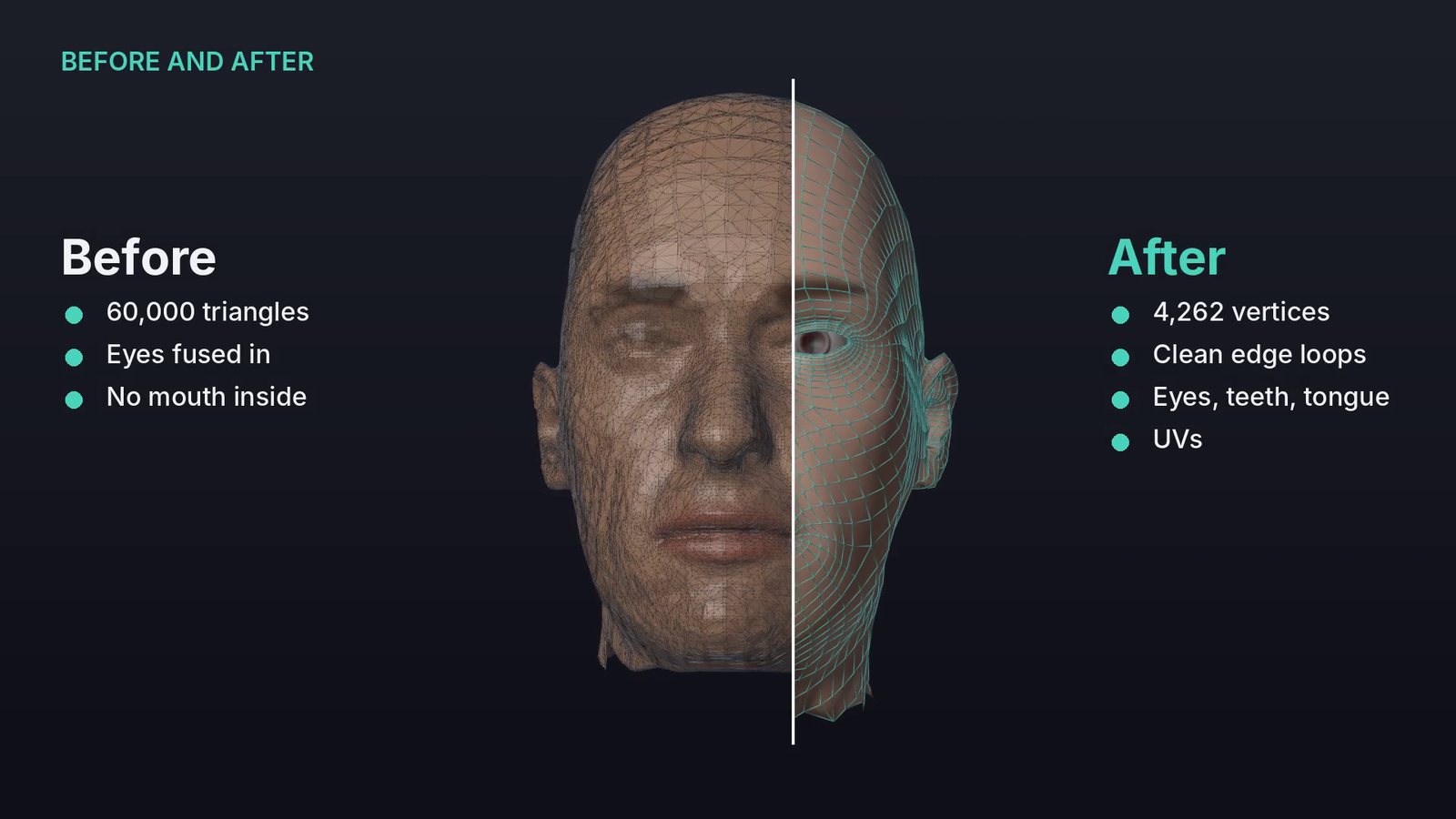
A 3D scan or an AI-generated head comes as one dense mesh of triangles: eyes fused into the head, no mouth inside, no edge loops for animation. Retopology by hand takes hours for every head. HeadWrap, our Blender add-on, finds the face by itself and fits a clean template head onto yours in about 10 seconds, with eyeballs, teeth, a tongue and UVs. Your own head is not changed.
Get HeadWrap Watch the 5-minute tutorial
What you need
- Blender 4.2 or newer (tested on 4.2 LTS and 5.2 LTS), on Windows, macOS or Linux. HeadWrap works offline.
- A realistic or semi realistic head mesh with a face (eyes, nose and mouth): a 3D scan, a sculpt or an AI-generated head. A head on its own or with a neck and shoulders, any size, any direction.
- Separate eyeballs are fine, and so are eyes fused into the head.
- For Bake Texture: a material with your head's texture (a scan or an AI-generated head usually has one).
- Optional, for shape keys: FaceKeys Full (sold separately).
Steps
- Install HeadWrap. Edit > Preferences > Get Extensions, open the menu in the top right corner, choose Install from Disk and pick headwrap-1.0.0.zip. In the 3D Viewport press N and open the HeadWrap tab.
- Prepare the head. Hide or remove hair, hats and glasses that cover the face: hair that is part of the head mesh becomes part of the head shape. Open eyes and a closed or slightly open mouth work well. No need to apply scale or rotation.
- Pick the head. Select your head mesh, or pick it in the Head field.
- Check the face points (optional). Press Find Face Points. Green lines show the eyes, brows, lips and the face outline. If a point is off, move it in Edit Mode.
- Press Wrap Head. HeadWrap finds 478 face points and fits the template in about 10 to 20 seconds (Esc cancels). A new collection holds the wrapped head, two eyes, the teeth and the tongue, and the panel shows how close the fit is, for example "Average gap 0.7 mm, on the face 0.4 mm (at life size)".
- Bake the texture. In the Texture panel pick 1024, 2048 or 4096 px, tick Normal Map for wrinkles and pores, and press Bake Texture. It uses Cycles. The images are packed in the .blend file; use Image > Save As to take them to another program.
- Make shape keys (optional). With FaceKeys Full installed, press Make Shape Keys with FaceKeys: the 52 ARKit face shape keys on the head, its eyes, teeth and tongue, in one click.
Stylized head, or no face found? Set Face Points to Guided, press Click Points and click 10 points on the face: the corners of both eyes, the middle of the right upper and lower lid, both mouth corners, the middle where the lips meet, and the chin.
Video tutorial (5 minutes)
Every step on a test head: install, face points, Wrap Head, the result, the same UVs on every head, the texture bake, the options, Guided mode for stylized heads, and shape keys with FaceKeys.
What the wrapped head has
- Clean topology: 4,262 vertices, quads with edge loops around the eyes and the mouth, closed at the neck.
- The same UVs and the same vertex order on every wrapped head (at the same detail level), so textures, shape keys and weights made for one head fit the others.
- Eyes, teeth, a tongue and the mouth inside. Each eye is its own object with its origin in the eyeball center, ready to turn.
- Detail levels: Base (4,262 vertices), Medium (about 17,000) and High (about 68,000) for close-ups and sculpting.
- Open Neck removes the neck cap, for joining the head to a body with Bridge Edge Loops.
Measured in the tutorial: face found in 2.5 s, wrapped in 8.7 s, average gap 0.7 mm (0.4 mm on the face) at life size, a 2048 px texture bake in 5 s. On the 12 test heads of the store tests the average gap was 0.7 to 0.9 mm at life size, 0.3 to 0.6 mm on the face.
Get HeadWrap
HeadWrap is our Blender add-on for clean head topology. One zip for Windows, macOS and Linux; nothing is downloaded and nothing is sent anywhere.
HeadWrap on Superhive BOOTH Gumroad Jinxxy
Shape keys next: FaceKeys Full (sold separately) makes the 52 ARKit face shape keys on the wrapped head with one click, and can also make all 102 keys for VRChat's built-in face tracking.
Questions
- Do I have to place points?
- No. HeadWrap finds the face by itself on realistic heads. For stylized heads, Guided mode asks for 10 clicks.
- Does it work on AI-generated heads and scans?
- Yes, when the head is realistic. Remove hair that is fused into the head first if you can, or it becomes part of the head shape.
- Does it keep my texture?
- Bake Texture moves your head's color, and a normal map for the fine detail, onto the clean UVs.
- Is my head changed?
- No. HeadWrap makes a new set of objects in its own collection.
- Does it rig the head?
- No. It gives you clean topology. FaceKeys Full (sold separately) makes the 52 ARKit face shape keys on it with one click, and can also make all 102 keys for VRChat's built-in face tracking.
- Can I use my own template?
- Not in version 1.0. It ships one template, a realistic adult head with eyes, teeth and tongue.
- Does it work offline?
- Yes. Pure Python, one zip for Windows, macOS and Linux. Nothing is downloaded and nothing is sent anywhere.
- Which heads fit less well?
- It is made for realistic and semi realistic heads; very cartoony proportions may not fit well. Ears keep the template's clean shape, and the neck ends just below the jaw, so longer necks and shoulders are left out. Small folds, most often in the ears, can be smoothed with the Smooth brush.
More guides
- Perfect Sync for any VRM model in Blender
- ARKit 52 blendshapes (Perfect Sync): all names
- Fit an outfit made for another avatar base onto your avatar
Last checked: 18 November 2026.