Meshwright guides › Perfect Sync for any VRM model in Blender
Perfect Sync for any VRM model in Blender
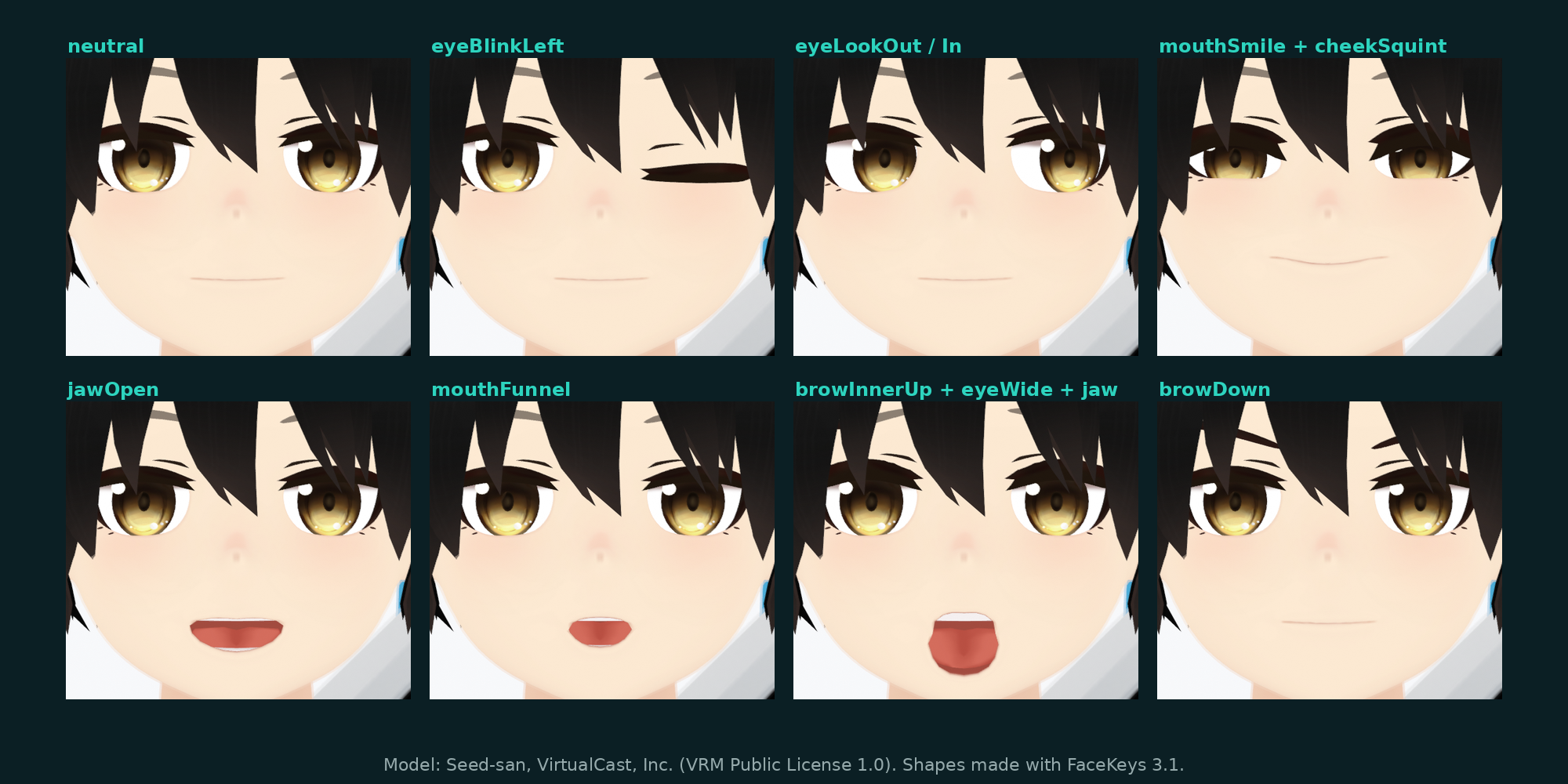
Perfect Sync means your VRM model has the 52 ARKit face shapes and the VTuber app can find them. Then iPhone face tracking moves brows, eyes, cheeks, lips and tongue one by one, not just blink and five vowels. Most guides send you to HANA_Tool (VRoid models, Unity), to hours of sculpting, or to a commission. This is the Blender way, for any VRM model, VRoid or not.
What you need
- Blender 4.2 or newer.
- The free VRM Add-on for Blender (imports and exports .vrm).
- FaceKeys 3.1 or newer, Lite or Full. Lite covers anime, VRoid and toon models; Full adds realistic heads.
- Optional: the free FaceKeys Check, to see which of the 52 shapes your model already has.
Steps
- Install the VRM Add-on. Edit > Preferences > Get Extensions, search "VRM", Install.
- Import your model. File > Import > VRM (.vrm). VRM 0.x and VRM 1.0 both work.
- Pick the face. Select the face mesh, open the sidebar (N key) > FaceKeys. Anime, VRoid or toon model: Anime mode (Lite is always Anime mode). Realistic head: Automatic or Guided mode (Full).
- Make the 52 shapes. Leave Names on ARKit and press Generate. FaceKeys builds them from the model's own expressions (blink, vowels, smile, brows, eye looks), also from its VRM expressions when the shape key names say nothing.
- Press VRM Perfect Sync. It writes the 52 expressions (EyeBlinkLeft, JawOpen and so on) into the VRM model for VRM 0.x and VRM 1.0 at once, each bound to its FaceKeys shape key. Your other expressions (blink, aa, happy, your own) stay as they are.
- Export. File > Export > VRM. The armature's VRM tab sets the version: VRM 0.x for VSeeFace, VNyan and Luppet; VRM 1.0 or 0.x for VMagicMirror. Warudo reads the shape keys themselves.
- Turn on Perfect Sync in the app and connect your iPhone tracker (iFacialMocap, Waidayo, Facemotion3d or the app's own).
What each app reads
| App | What it looks for | Export as |
|---|---|---|
| VMagicMirror | VRM expressions named EyeBlinkLeft ... TongueOut (since v5.2.0 letter case is ignored) | VRM 0.x or 1.0 |
| VSeeFace | all 52 as VRM blend shape clips; they may be empty, but all must be there | VRM 0.x (no VRM 1.0 in VSeeFace) |
| Warudo | shape keys with ARKit names: eyeBlinkLeft, jawOpen ... | any; keep the ARKit names |
| VNyan | the 52 ARKit blendshape clips | VRM 0.x |
| Luppet | BlendShapeClips with the 52 names, letter case counts | VRM 0.x |
Sources: VMagicMirror Perfect Sync tips, VSeeFace manual, Warudo 3D primer, Luppet FAQ, a copy of the VNyan docs. Read 17 November 2026.
Questions
- Do I need Unity?
- No. Everything happens in Blender, and the VRM file you export is ready for the app.
- Does it change my expressions?
- It adds or updates only the 52 Perfect Sync expressions. Blink, vowels, joy, angry and your own expressions keep their settings.
- My model is from VRoid Studio.
- FaceKeys reads VRoid's Fcl_ keys, also when the VRM Add-on puts the mesh name in front of them. The Fcl_ expressions stay on the model.
- Some shapes do nothing on my model.
- A shape needs a part to move: tongueOut needs a tongue mesh. The expression is still written, empty, which the apps accept. The FaceKeys report names every empty key and why.
- I used VRChat names.
- The button binds them too: some ARKit shapes are 2 to 4 VRChat keys, and all are bound. For Warudo, generate with ARKit names, because Warudo reads the shape key names.
- How is this different from HANA_Tool?
- HANA_Tool works on VRoid models in Unity. FaceKeys works in Blender on any VRM model, and makes the shapes too when your model has none.
- Can I check my model for free first?
- Yes. FaceKeys Check counts the 52 ARKit shapes, the 102 VRChat tracking keys and the 15 visemes, and lists what is missing. It changes nothing.
Check your model first, free
FaceKeys Check is a free Blender add-on. It lists which of the 52 shapes your model has and which are missing. It changes nothing.
Get FaceKeys Check (free, Gumroad) BOOTH
Make the shapes and the expressions
FaceKeys is our paid Blender add-on. It builds the 52 ARKit shapes from the model's own expressions and, since 3.1, writes the 52 Perfect Sync expressions into the VRM model.
More guides
- ARKit 52 blendshapes (Perfect Sync): all names
- VRChat face tracking shape keys: all 102 names
- Automatic head retopology in Blender
- Fit an outfit made for another avatar base onto your avatar
- Unified Expressions from ARKit (Perfect Sync)
Last checked: 17 November 2026.